How to Unsubscribe Jazz Package In 2025 Updated Info
To deactivate all Jazz Services, follow these steps. Mobilink Jazz users can unsubscribe without difficulty. follow these steps to remove unused services:

Service Name | Deactivation Code |
|---|---|
MY STATUS | Send UNSUB to 6085 |
AUTO REPLY | Dial *7071# |
CALLER TUNE | Send UNSUB to 230 |
GAMELOFT | Send Game Stop to 6767 |
TV APP | Send UNSUB to 6611 |
GAME NOW | Send UNSUB to 6611 |
GAME CLUB | Send UNSUB to 6611 |
DRIVE APP | Use the Jazz Drive App |
HUNGAMA | Call on 111 or send UNSUB to 6611 |
GAME LEAGUE | Send UNSUB to 6611 |
INSTANTIC SMS | Send BLOCK to 6064 |
BLOCK CALL & SMS | Dial *420# |
MEGASTORE | Call on 111 |
ADVANCE BALANCE | Dial *112*4# |
SLYPEE | Send UNSUB to 6611 |
DAILY SMS PACKAGE | Dial *101*4*01# |
CHAMPION PACKAGE | Dial *337*8# |
BALANCE SAVE | Dial *275*4# |
Deactivate all Jazz Services with 2 simple Methods
Method 1:
You can Deactivate all Jazz Services with this simple code:
Method 2:
You can Unsubscribe All Mobilink Jazz Packages with this 2nd Code Method
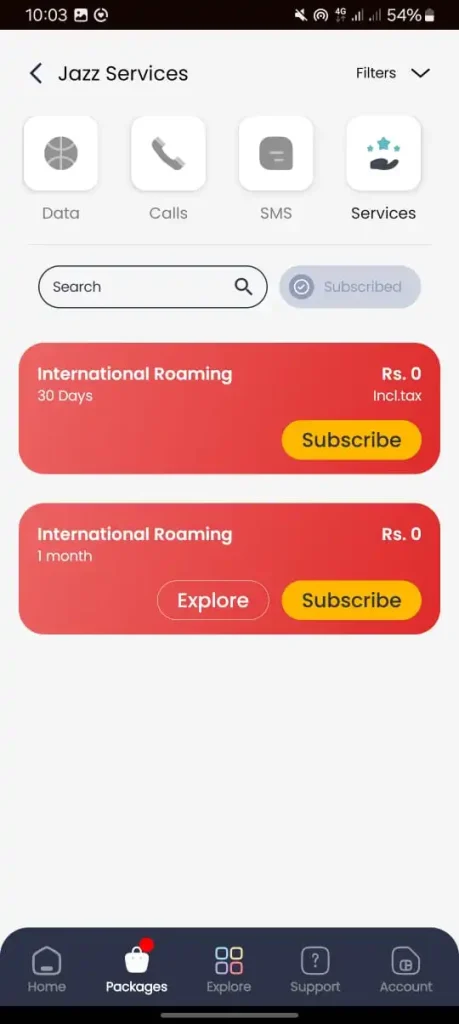
Deactivate all Jazz Services with Jazz Simosa App
follow these simple steps to unsubscribe through Jazz Simosa App:
- Open Jazz simosa App.
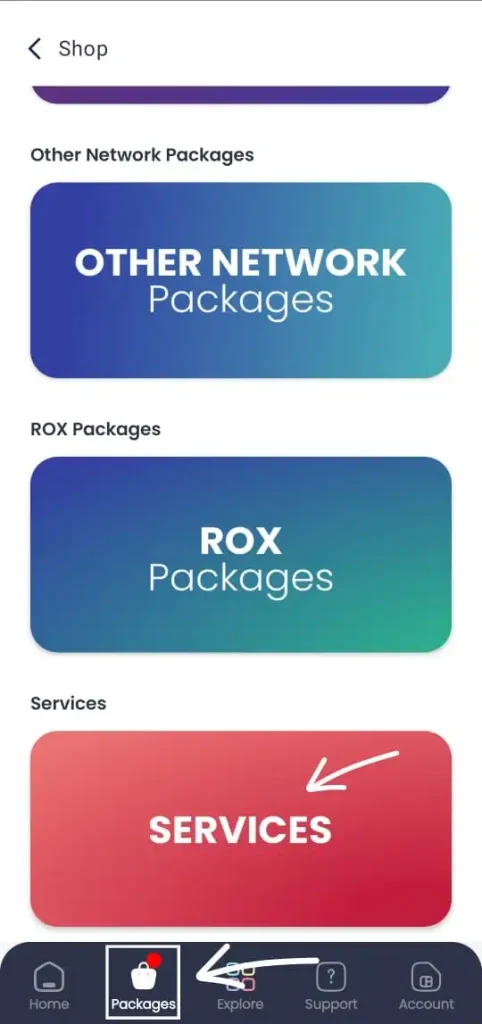
- Click Packages option in the App. then scrol down and click on the services option
- There you will see the subscribed Option click on it
- Press the Subscibed service and Unsubscribe it
Pro tip:
After unsubscribing the All of the services save your jazz balance for later use.